
No Watermark Added
VideoDownloader does not stamp its own logo, text, or branding overlay onto the downloaded video.
Download Instagram videos without watermark online for free. Paste a public Instagram video link and save the available video in high quality—no login, app, or browser extension required. A free Instagram video downloader without watermark that works in your browser.
Only download videos you own or have permission to use. Copyright remains with the original creator.
Works with publicly accessible Instagram video links. VideoDownloader does not add its own logo, text, or watermark to downloaded files.
Use this free Instagram video downloader without watermark online to save available videos from public posts without an added VideoDownloader logo or branding overlay. For Instagram video download online without watermark, no Instagram login, mobile app, or browser extension is required.
VideoDownloader does not stamp its own logo, text, or branding overlay onto the downloaded video.
Paste a public Instagram video URL and process it directly in your browser without installing software.
Save the highest available video option detected for the public Instagram link.
Public links can be processed without entering your Instagram username or password.
Copy the link to a public Instagram video, paste it into the downloader, and save the available video file to your device.
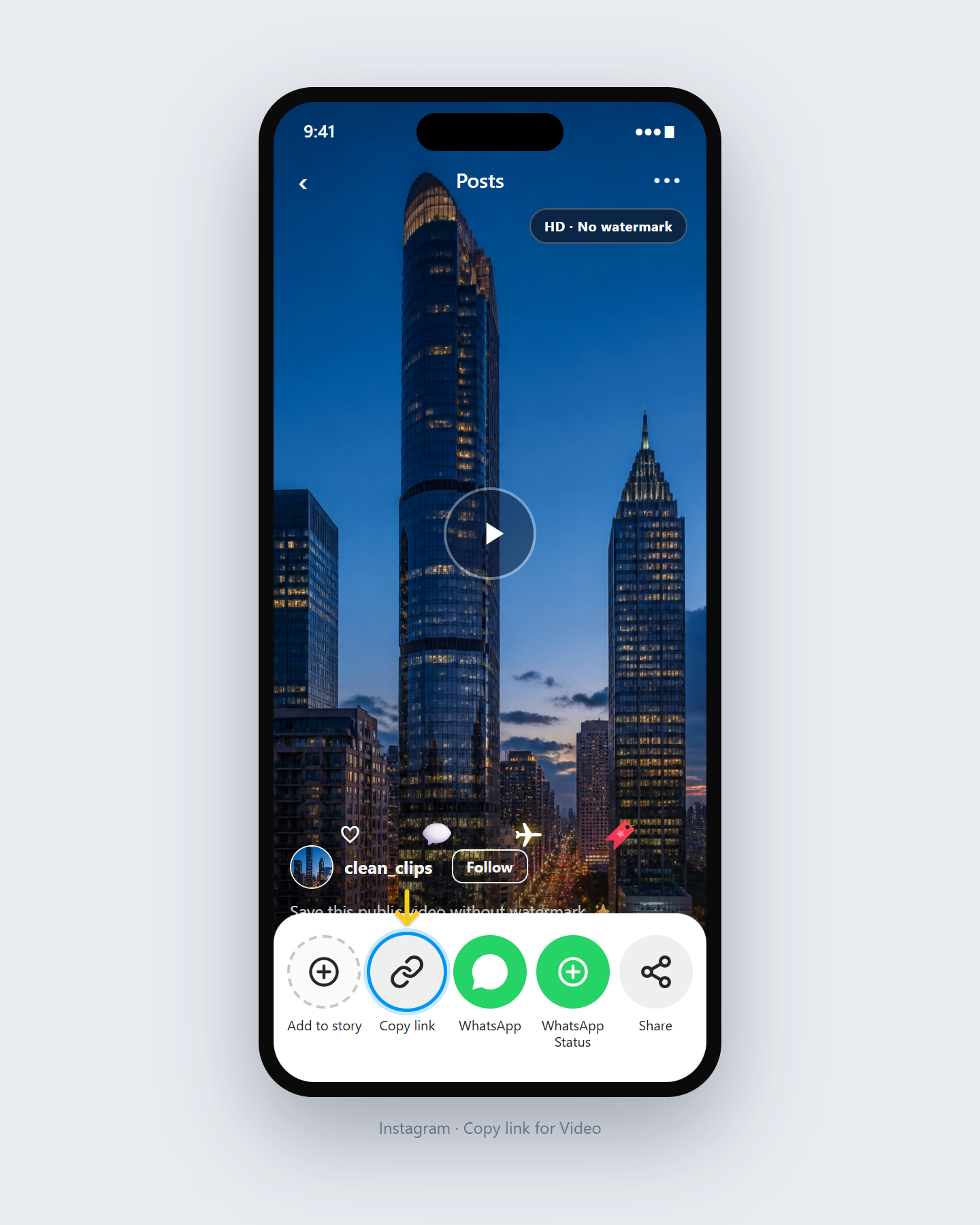
Open the public Instagram video you want to save, tap Share, and choose Copy Link.
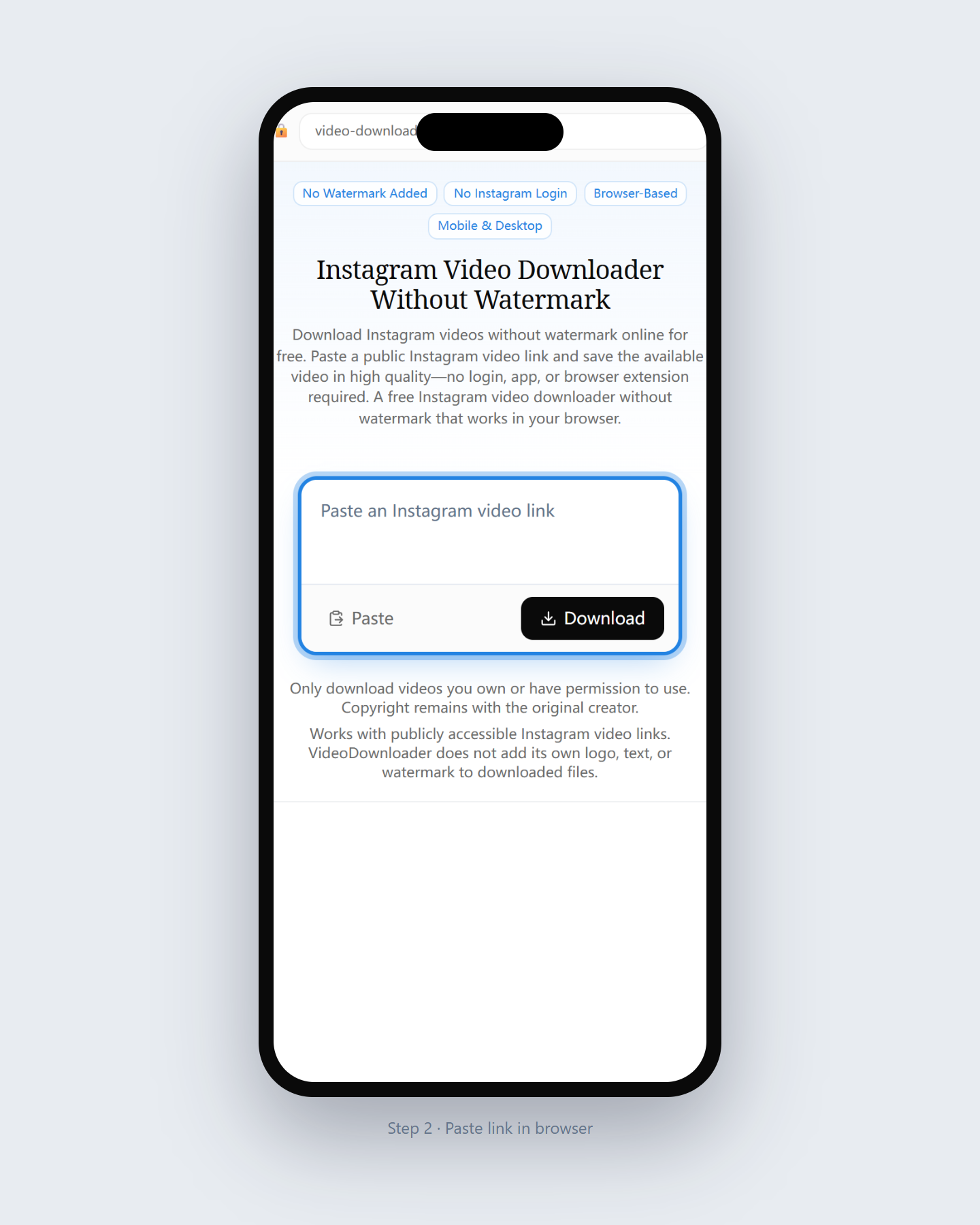
Return to this page and paste the complete Instagram video URL into the input field above.
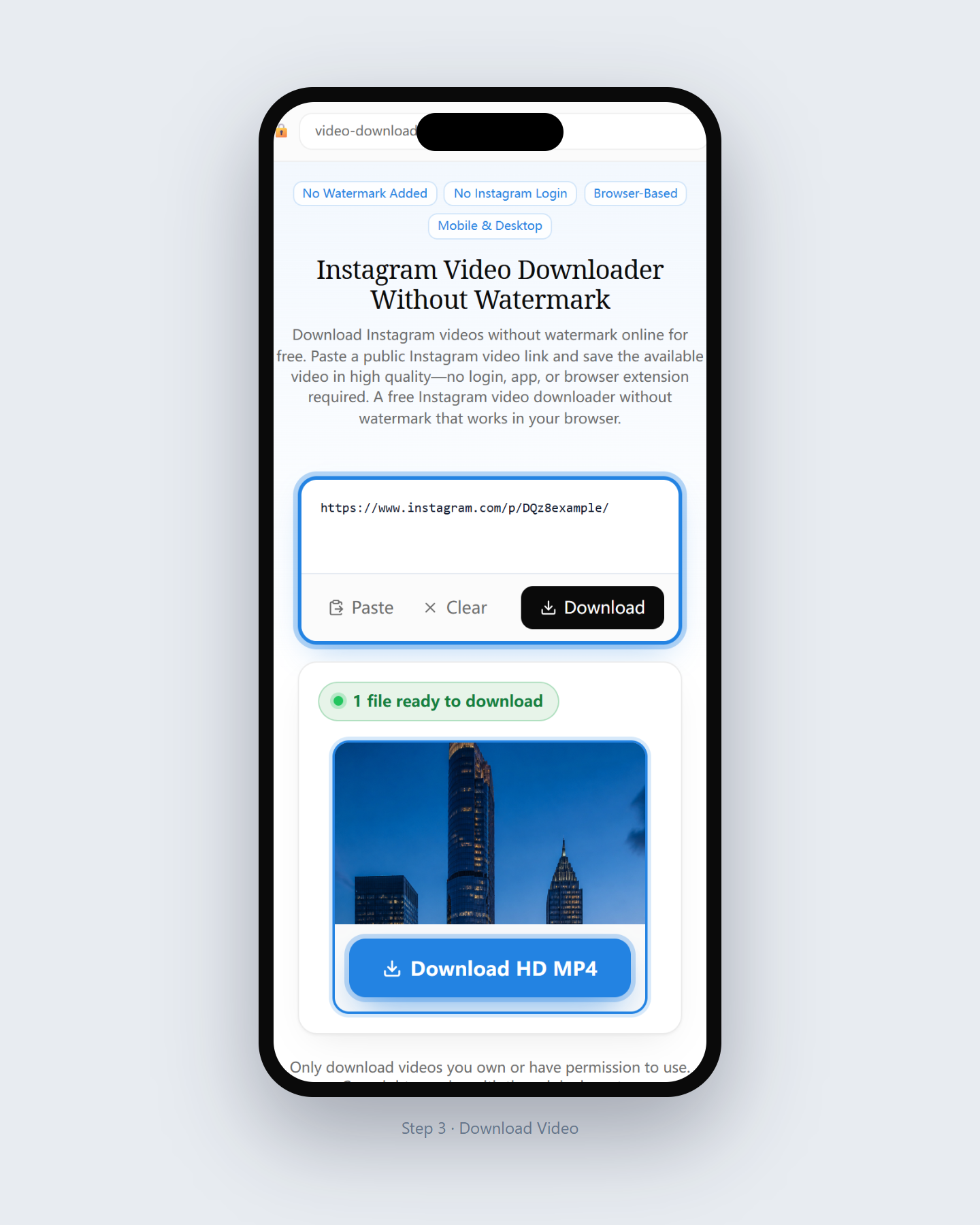
Review the detected video option and save the available file without any watermark added by VideoDownloader.
VideoDownloader does not add its own logo, text, or branding overlay to the video file you download. The available file reflects the media Instagram provides for the public link.
This is different from removing a watermark that already appears inside the original video. If the creator uploaded a video containing a logo, username, caption, or other visual mark, that content may remain in the downloaded file.
VideoDownloader can
VideoDownloader does not promise to
Video quality depends on the original upload and the media options Instagram makes publicly available for the link. An Instagram HD video download without watermark is only possible when the source exposes HD or higher. VideoDownloader displays the detected download option without intentionally reducing or upscaling the source video. If an HD, 1080p, or higher-quality version is available from the source, it may appear as a download option. The Instagram video downloader 4K without watermark option cannot be created when the original source does not provide 4K.
The downloader retrieves the available video option without intentionally lowering its resolution.
Instagram video downloads are typically provided as video files such as MP4 when detected.
The tool does not label a low-resolution source as 1080p or 4K when that quality is unavailable.
Private accounts, restricted posts, Close Friends content, expired Stories, and links that require Instagram login are not supported.
Downloaded files are not stamped with VideoDownloader branding.
Use the tool directly in Chrome, Safari, Firefox, or Edge.
There is no need to install an Instagram video download extension or grant additional browser permissions.
No VideoDownloader account is required to process supported public links.
Use the same downloader on iPhone, Android, Windows, Mac, or tablet.
Copy the public link, paste it into the downloader, and save the available file.
Open VideoDownloader in Safari, paste the public Instagram video link, and download the available file. Depending on your iOS settings, the video may first appear in the Files app.
Use Chrome or another modern browser. After downloading, check your Downloads folder, browser download list, or Gallery.
Paste the public Instagram video URL into the downloader using any supported desktop browser and save the file to your Downloads folder.
| Comparison | Online downloader | Mobile app | Browser extension |
|---|---|---|---|
| Installation | Not required | Required | Required |
| How you use it | Paste a public link | Operate inside the app | Operate from the browser |
| Device fit | Phone and computer | Usually OS-limited | Usually browser-limited |
| Instagram login | Not required | Some apps may require it | Some extensions need permissions |
| Updates | Updated on the website | User updates the app | User updates the extension |
| Best for | Quick, occasional downloads | Heavy mobile use | Heavy desktop use |
For a quick Instagram video download without watermark, an online tool avoids an Instagram video download extension without watermark and works across multiple devices—no app install required.
Use the general Instagram Video Downloader for standard public video posts. Use this page when your main concern is saving the available video without any watermark added by the downloader.
Also review our Terms of Service and Privacy Policy.
Clear answers about downloading public Instagram videos without an added downloader watermark.
Copy the link to a public Instagram video, paste it into the downloader, and select the available video file for an Instagram video download without watermark. VideoDownloader does not add its own logo or branding overlay.
Yes. You can use the online downloader without paying a subscription or installing an app.
No. The tool does not add its own watermark, but it does not erase logos, usernames, text, or other marks already contained in the original video.
Video quality depends on what the original public Instagram link makes available. If an HD or 1080p option is detected, it may appear in the results.
Only when a corresponding high-quality source is publicly available. VideoDownloader does not artificially convert a lower-resolution video into 4K.
No. The downloader works online in a modern browser on phone, tablet, or computer.
No. Paste the public Instagram video URL directly into the online downloader without installing an extension.
No. Private and restricted content is not publicly accessible and is not supported.
“Water maker” is a common search variation or misspelling of “watermark.” This page is designed for users looking to download available public Instagram videos without an additional watermark added by the downloader.
Paste a public Instagram video link above for an Instagram video download without watermark, and save the available file without VideoDownloader branding added.
Download Instagram Video