No Watermark Added
Video Downloader does not stamp its own logo, text, or branding overlay onto the downloaded video.
 VideoDownloader
Save supported public Instagram videos without Video Downloader adding its own logo, text, or branding overlay. Paste a public link and download an available video file online—no Instagram login or app required.
Only download videos you own or have permission to use. Copyright remains with the original creator.
Works with publicly accessible Instagram video links. Video Downloader does not add its own logo, text, or watermark to downloaded files.
What “without watermark” means: Video Downloader does not add its own branding to the downloaded file. It does not remove watermarks, usernames, subtitles, logos, captions, or other elements already embedded in the original video.
Save available videos from supported public Instagram posts without Video Downloader adding its own logo, text, or branding overlay. Paste a public link in your browser—no Instagram login required.
Video Downloader does not stamp its own logo, text, or branding overlay onto the downloaded video.
Paste a public Instagram video URL and process it directly in your browser without installing software.
Review the video options detected for the public Instagram link. Quality depends on the source.
Public links can be processed without entering your Instagram username or password.
Copy the link to a public Instagram video, paste it into the downloader, and save the available video file to your device.
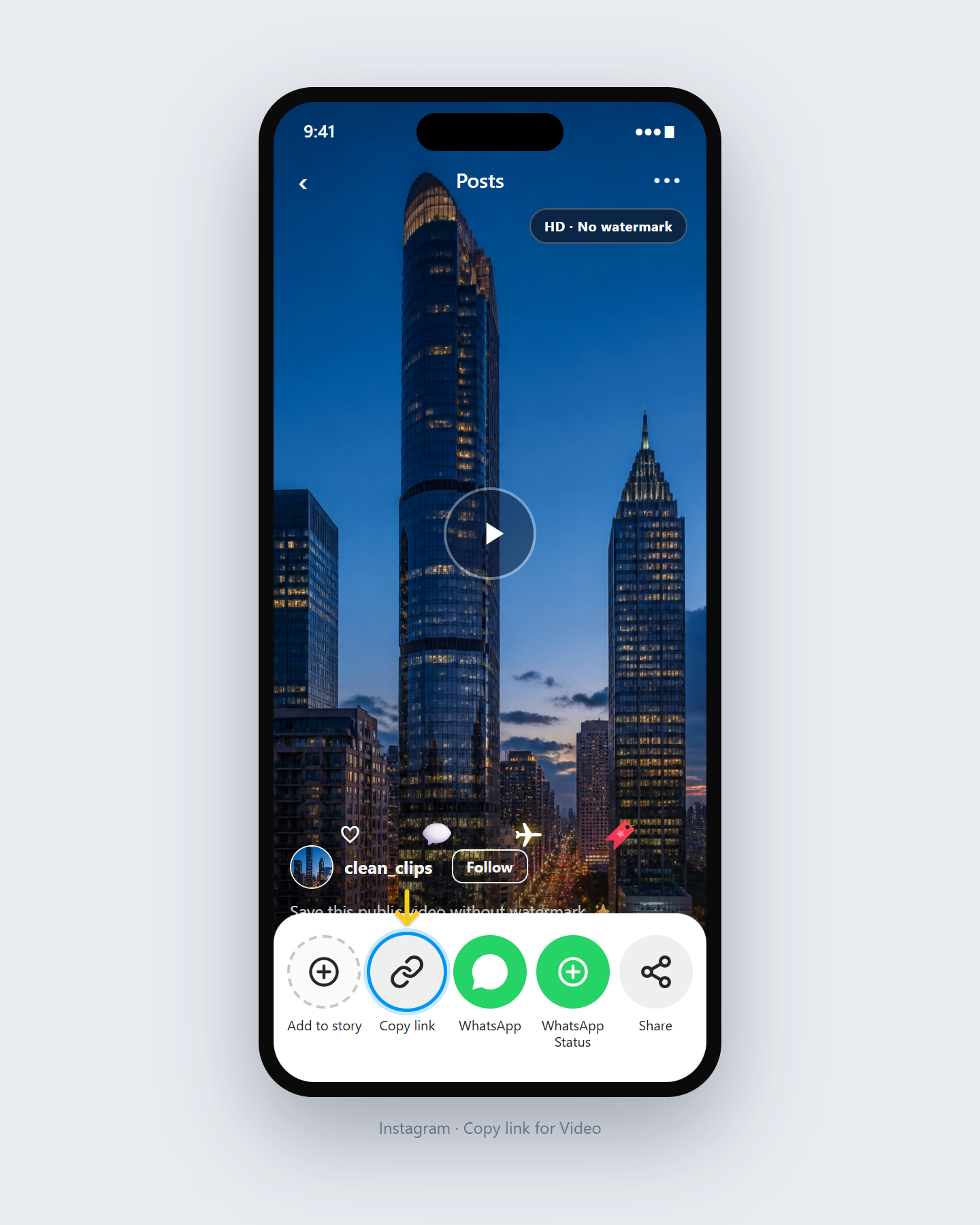
Open the public Instagram video you want to save, tap Share, and choose Copy Link.
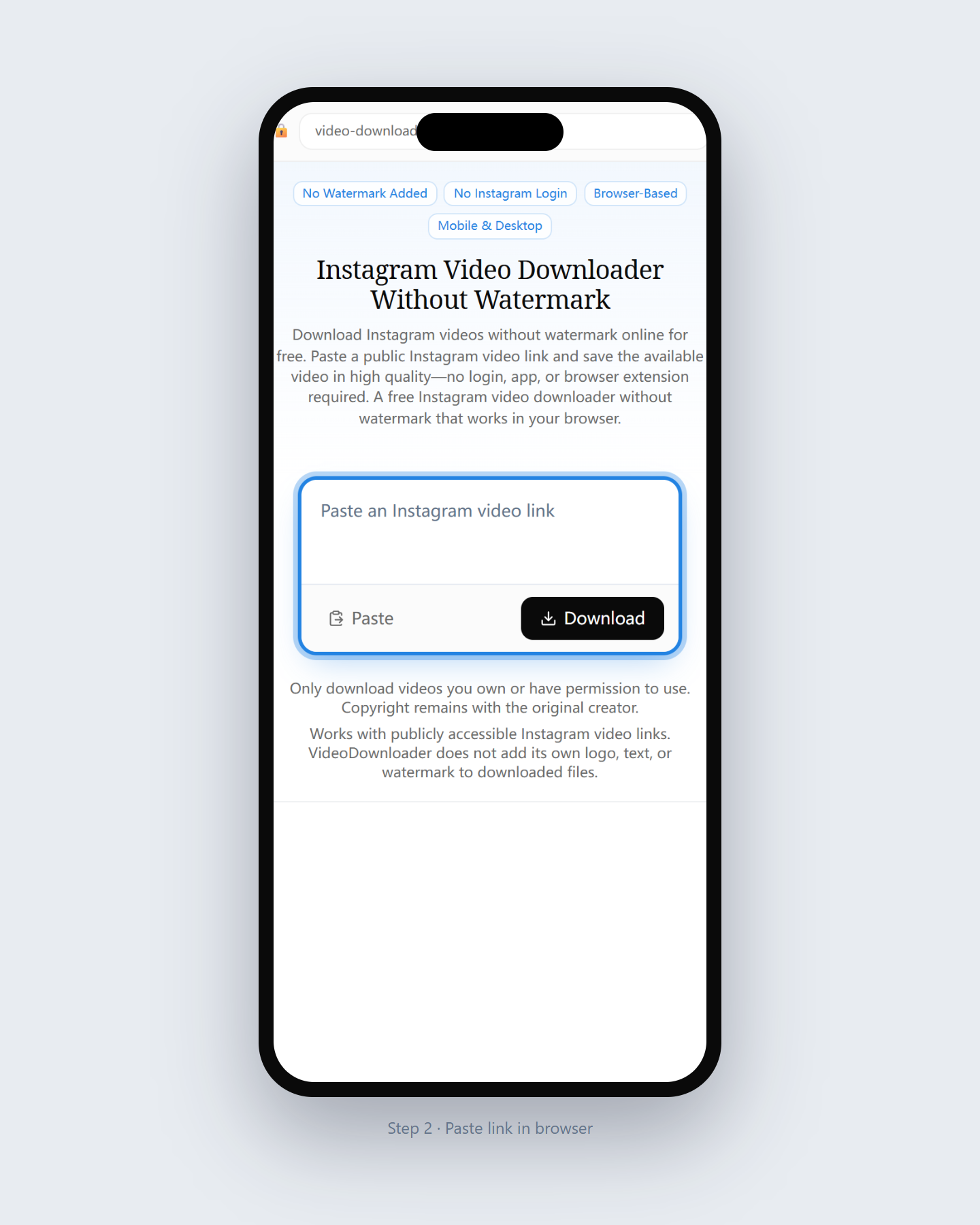
Return to this page and paste the complete Instagram video URL into the input field above.
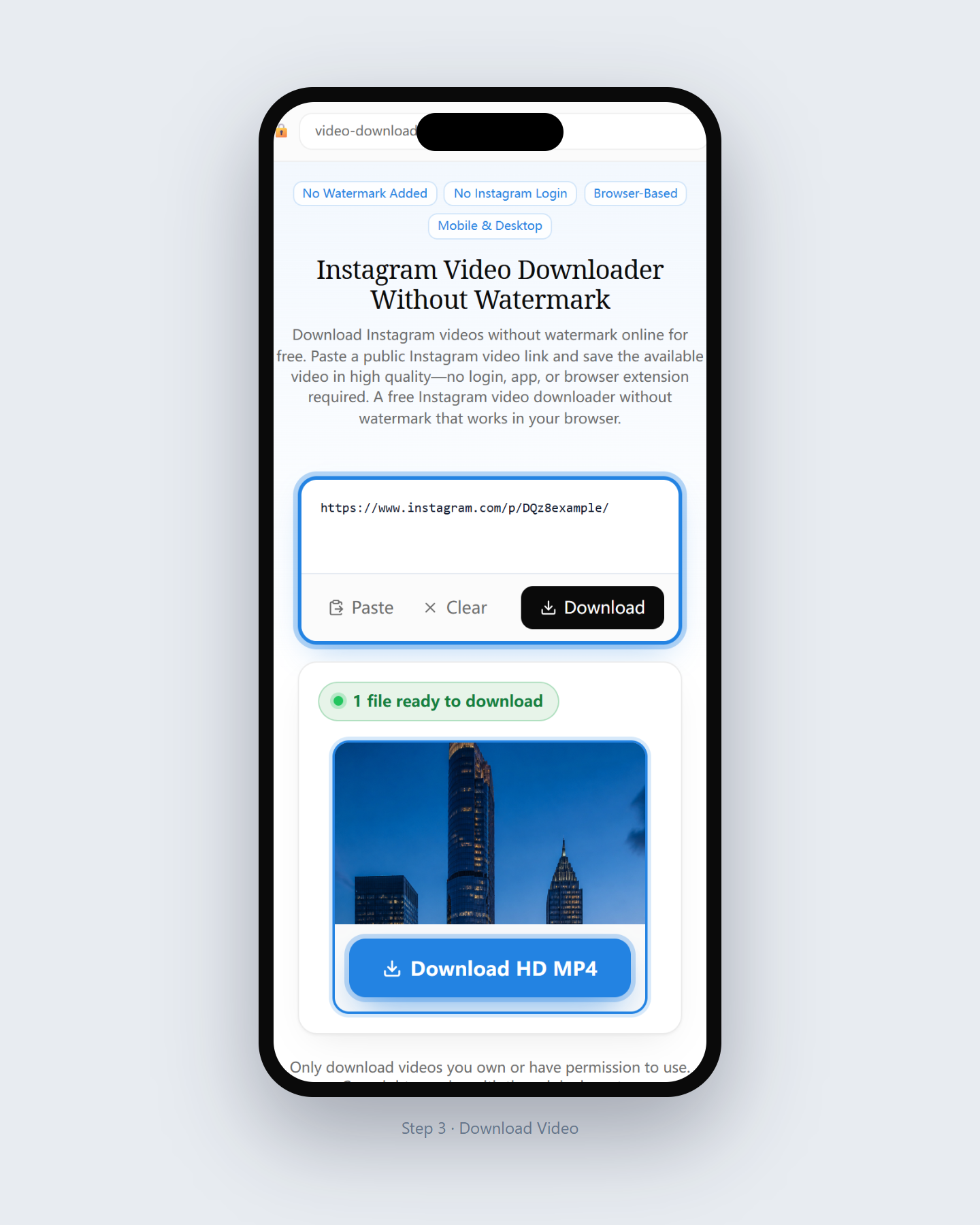
Review the detected video option and save the available file without any watermark added by Video Downloader.
On this page, “without watermark” means that Video Downloader does not place its own logo, text, or promotional branding over the downloaded video.
The tool does not erase or alter visual elements already contained in the original Instagram video. Creator logos, usernames, captions, subtitles, stickers, and source-embedded watermarks remain part of the original file. Only download videos you own or have permission to save. Copyright and ownership remain with the original creator.
Video Downloader can
Video Downloader does not promise to
Download quality depends on the video options available for the supported public Instagram post. When more than one file option is detected, you can review the available choices before saving. Video Downloader does not artificially upscale videos or promise a specific resolution such as HD, 1080p, or 4K. The downloaded file reflects the quality available from the source post.
Choose from the video options detected for the public Instagram post. Available quality varies by source.
Downloaded videos are often available as MP4 files, depending on the media options detected for the post.
The tool does not convert a lower-resolution source into 1080p or 4K, and it does not make unsupported quality promises.
Private accounts, restricted posts, Close Friends content, expired Stories, and links that require Instagram login are not supported.
Open Video Downloader in Safari, paste the public Instagram video link, and download the available file. Depending on your iOS settings, the video may first appear in the Files app.
Use Chrome or another modern browser. After downloading, check your Downloads folder, browser download list, or Gallery.
Paste the public Instagram video URL into the downloader using any supported desktop browser and save the file to your Downloads folder.
An online Instagram video downloader works in a supported browser, so there is no separate app, APK, software package, or browser extension to install.
Paste a supported public Instagram video link into the tool, review the available file, and download it to your device. Video Downloader does not ask for your Instagram password.
For deeper comparisons, read App vs. online tool and extension vs. online tool.
Use the general Instagram Video Downloader for standard public video posts. Use this page when your main concern is saving the available video without any watermark added by the downloader. Prefer not to install a browser add-on? Read extensions versus our online downloader.
Also review our Terms of Service and Privacy Policy.
Clear answers about downloading public Instagram videos without an added downloader watermark.
It means Video Downloader does not add its own logo, text, or branding overlay to the downloaded file. It does not remove elements already embedded in the original video.
No. Creator logos, usernames, captions, subtitles, stickers, and other elements already contained in the source video are not removed.
You can use the online tool without a subscription to save supported public Instagram videos without Video Downloader adding its own branding overlay.
No. The tool processes supported publicly accessible links and does not ask for your Instagram username or password.
No. Private, Close Friends, restricted, and login-required content is not supported.
Not necessarily. Quality depends on the available source file. Video Downloader does not upscale videos or guarantee a specific resolution.
Instagram videos are often available as MP4 files, but the exact format depends on the download options detected for the public post.
Yes. Use a supported browser, paste the public Instagram link, and save the available file using your device’s normal download process.
Yes. Use a supported browser, paste the public Instagram link, and save the available file using your device’s normal download process.
No. Publicly accessible supported links can be processed without sharing your Instagram login credentials.
No. Logos, captions, subtitles, and other elements already embedded in the source video remain part of that video.
Paste a public Instagram video link above for an Instagram video download without watermark, and save the available file without Video Downloader branding added.
Download Instagram Video