01
Back Up Your Own Instagram Posts
Keep a local copy of Reels, videos and photos you have published on your own Instagram account.
 VideoDownloader
Download supported public Instagram Reels, videos, photos, Stories, carousel posts, audio, and profile pictures. Paste an Instagram link into our free online downloader—no Instagram login, registration, or app installation required.
Only download content you own or have permission to use. By continuing, you agree to our Terms of Service.
Works with public Instagram links. No Instagram login or app required.
Keep downloads for personal, offline viewing. Do not republish or monetize someone else's content without permission. Creators keep the copyright.
Our online Instagram Downloader lets you save different types of public Instagram content directly to your device. Download Reels, videos, photos, Stories, carousel posts, profile pictures, and audio using only an Instagram link.
There is no need to create an account, log in to Instagram, or install an app. Copy the link to the public Instagram content you want to save, paste it into the downloader above, and download the available file to your phone, tablet, or computer.
Copy a public Instagram link, paste it into the Instagram Downloader, and save the available file to your device.
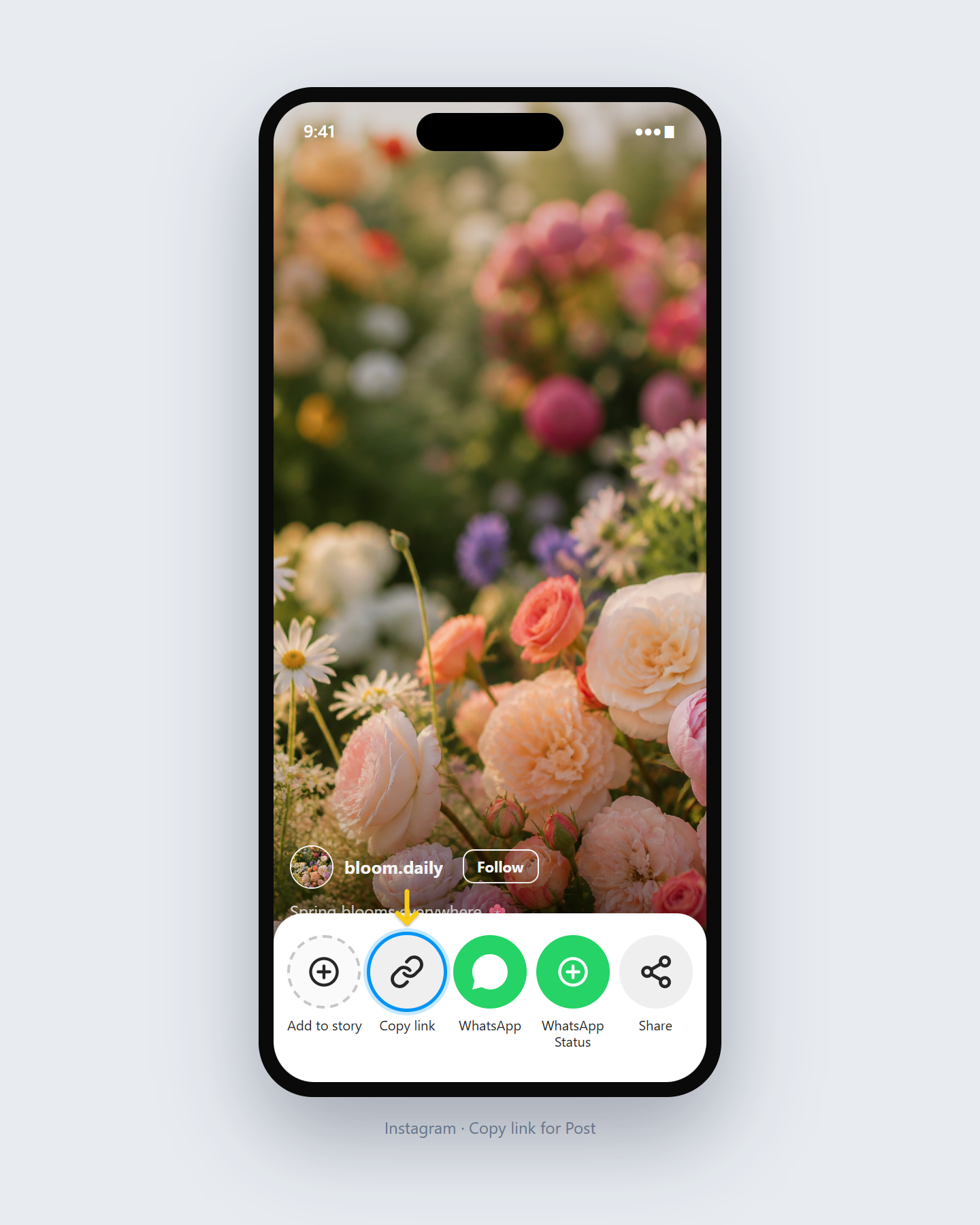
Open Instagram and copy the link to the Reel, video, photo, Story, carousel post, or public profile content you want to save.
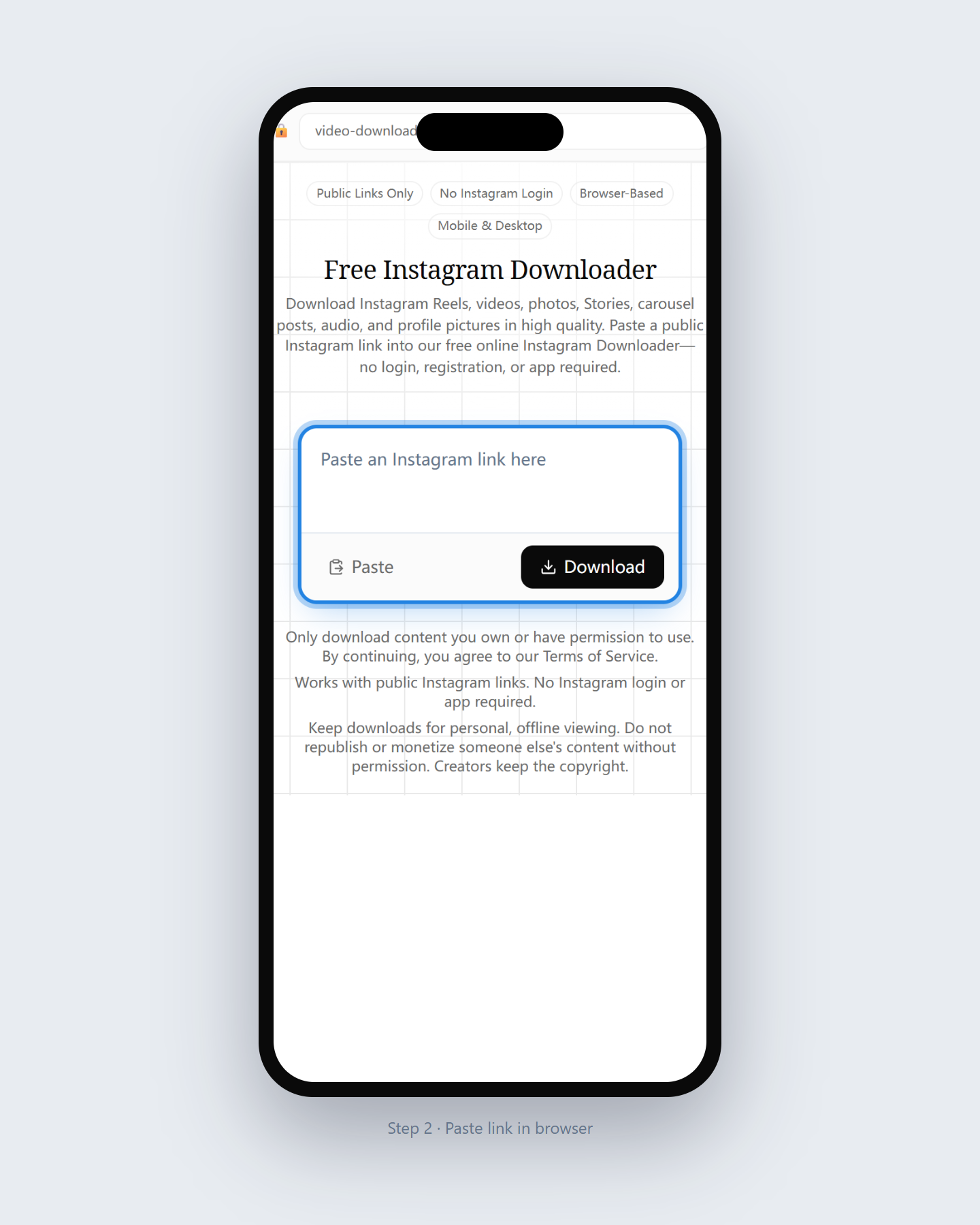
Paste the Instagram URL into the Instagram Downloader at the top of this page.
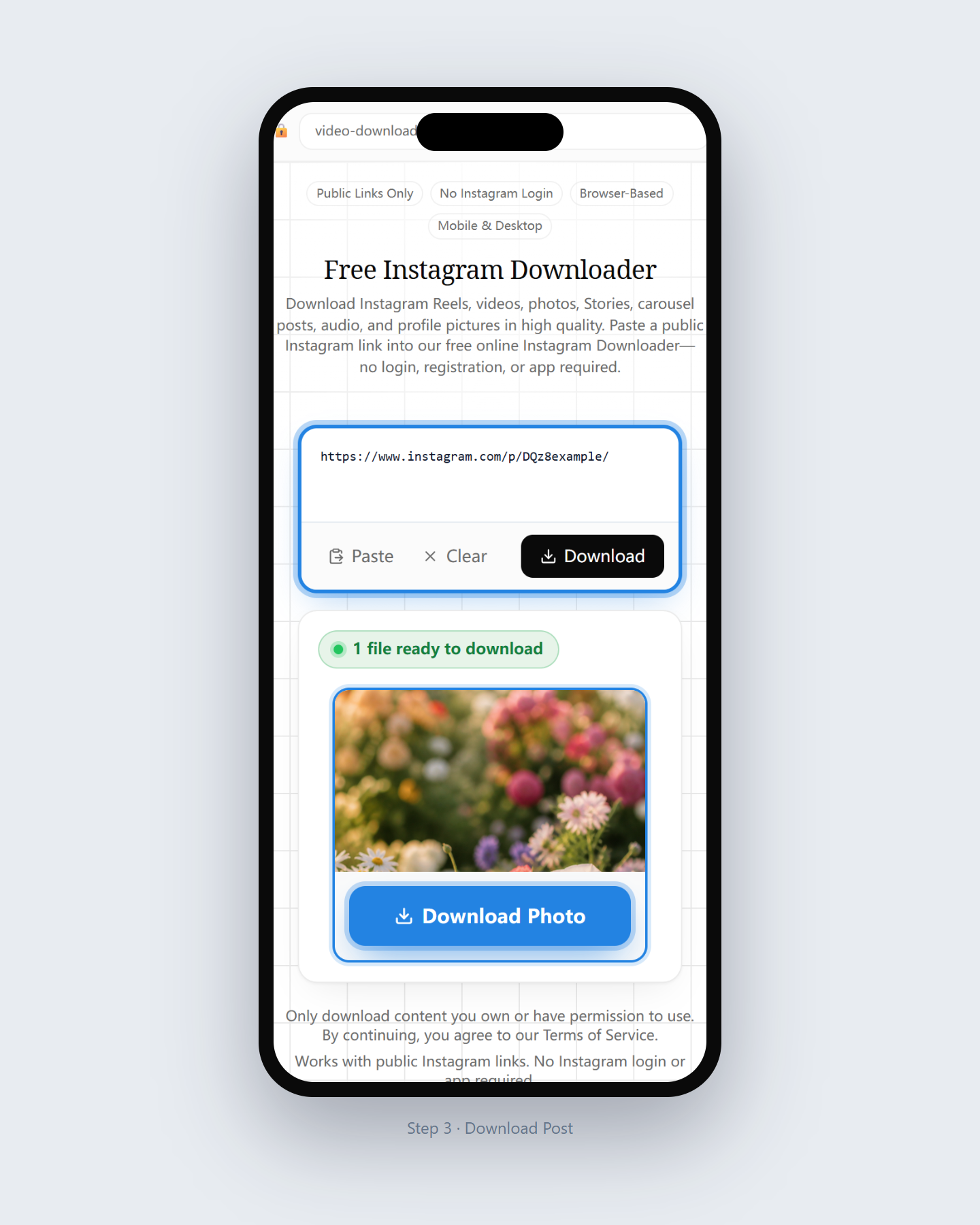
Choose the available file and save it directly to your phone, tablet, or computer.
Choose a dedicated Instagram download tool based on the content you want to save. Each tool is designed for a specific type of Instagram content, including videos, Reels, photos, Stories, carousels, audio, and profile pictures.
Save available public Instagram Reels for offline viewing.
Download supported public Instagram videos online and save available files, typically as MP4.
Save supported public Instagram videos without Video Downloader adding its own logo, text, or branding overlay.
Download Instagram photos in their original available resolution.
Save available Instagram Stories from public accounts before they disappear.
View and download an available Instagram profile picture from a supported public profile.
Save available audio from public Instagram content to your device.
Download photos and videos from public Instagram carousel posts.
Preview and download an available cover or thumbnail from a public Instagram Reel or video post.
Paste a public Instagram Highlight link and download available photos or videos inside.
A free online Instagram Downloader for public content—no login, no app, and support for multiple Instagram formats.
Use the online Instagram Downloader without a subscription or hidden fee.
Download public Instagram content without signing in or sharing your Instagram password.
Save available videos, Reels, and photos in the quality detected for each public link.
Use the Instagram Downloader on iPhone, Android, Windows, Mac, or tablet.
Everything works online in your browser, with no software or browser extension required.
Download Instagram videos, Reels, photos, Stories, carousels, audio, and profile pictures with dedicated tools.
Practical scenarios for saving public Instagram content with Video Downloader for personal, offline use.
01
Keep a local copy of Reels, videos and photos you have published on your own Instagram account.
02
Download media shared by a client, creator or collaborator when you have permission to save or reuse it.
03
Save permitted tutorials, recipes, workouts or other useful public content for personal offline reference.
The Instagram Downloader works in a modern browser on iPhone, Android, Windows, Mac, and tablet—no extra software required.
Open Video Downloader in Safari, paste the Instagram link, and choose an available download option. Depending on your iOS settings, the file may appear in Files first.
Use Chrome or another modern browser to paste the Instagram URL. Downloaded files are usually available in Downloads or your browser download list.
Open the Instagram Downloader in your browser on Windows or Mac, paste the Instagram URL, and save the available file to your Downloads folder.
The available file type, resolution and quality depend on the original public content and the media options made available by Instagram. Video Downloader displays the download options detected for each supported link.
Video Downloader is designed to process publicly accessible Instagram links. It does not provide access to private accounts and does not require your Instagram password.
Only download content that you own, that is available under an appropriate license, or that you have permission to save. Copyright and ownership remain with the original creator.
Video Downloader is an independent service and is not affiliated with, endorsed by or sponsored by Instagram or Meta Platforms, Inc.
Answers about using this free online Instagram Downloader for public Reels, videos, photos, Stories, and more.
An Instagram Downloader is an online tool that helps you save available public Instagram content, such as Reels, videos, photos, Stories, carousel posts, audio, and profile pictures, directly to your device.
Copy the link to the public Instagram content, paste the URL into the downloader, and select the available file you want to save.
Yes. You can use the Instagram Downloader online without paying a subscription fee.
No. You do not need to log in or share your Instagram password to download supported public content.
The available tools support public Instagram videos, Reels, photos, Stories, carousel posts, audio, and profile pictures. Availability may depend on the content type and public access.
Yes. The web-based downloader works in a supported browser on iPhone without requiring a separate app.
Yes. You can use the online downloader on Android, Windows, Mac, tablets, and other devices with a modern web browser.
No. The downloader is intended for supported content that is publicly accessible. It does not provide access to private accounts or restricted content.
Most files are saved in your browser's default Downloads folder. On mobile devices, they may appear in the Files app, Downloads folder, or photo library depending on your browser and settings.
We do not keep a personal library of the files you download. Media is delivered to your device through your browser. See our Privacy Policy for how site requests are handled.
Learn how to save permitted Instagram content on different devices and solve common download problems.
Save public Instagram videos to your iPhone camera roll: copy the link, download in Safari, find the file in Files, then move to Photos. No app or login.
Download public Instagram videos on PC with any browser — no Windows or Mac app, no extension, no login. Paste the link, save the file to your Downloads folder.
Learn what file format you get when downloading Instagram videos — often MP4 when detected, source-dependent quality, no forced conversion, and what MP4 does not guarantee.
Paste a public Instagram link and use our free online Instagram Downloader to save supported content directly to your device.
Download Now